

Context-Aware AI Detection
RedactifyAI reads context, not just patterns. It knows 'John Smith' in a signature block is PII, but 'Smith v. Jones' in a case citation is not.
RedactifyAI accuracy, Clio integration, and workflows built for law firms. Redact with confidence.
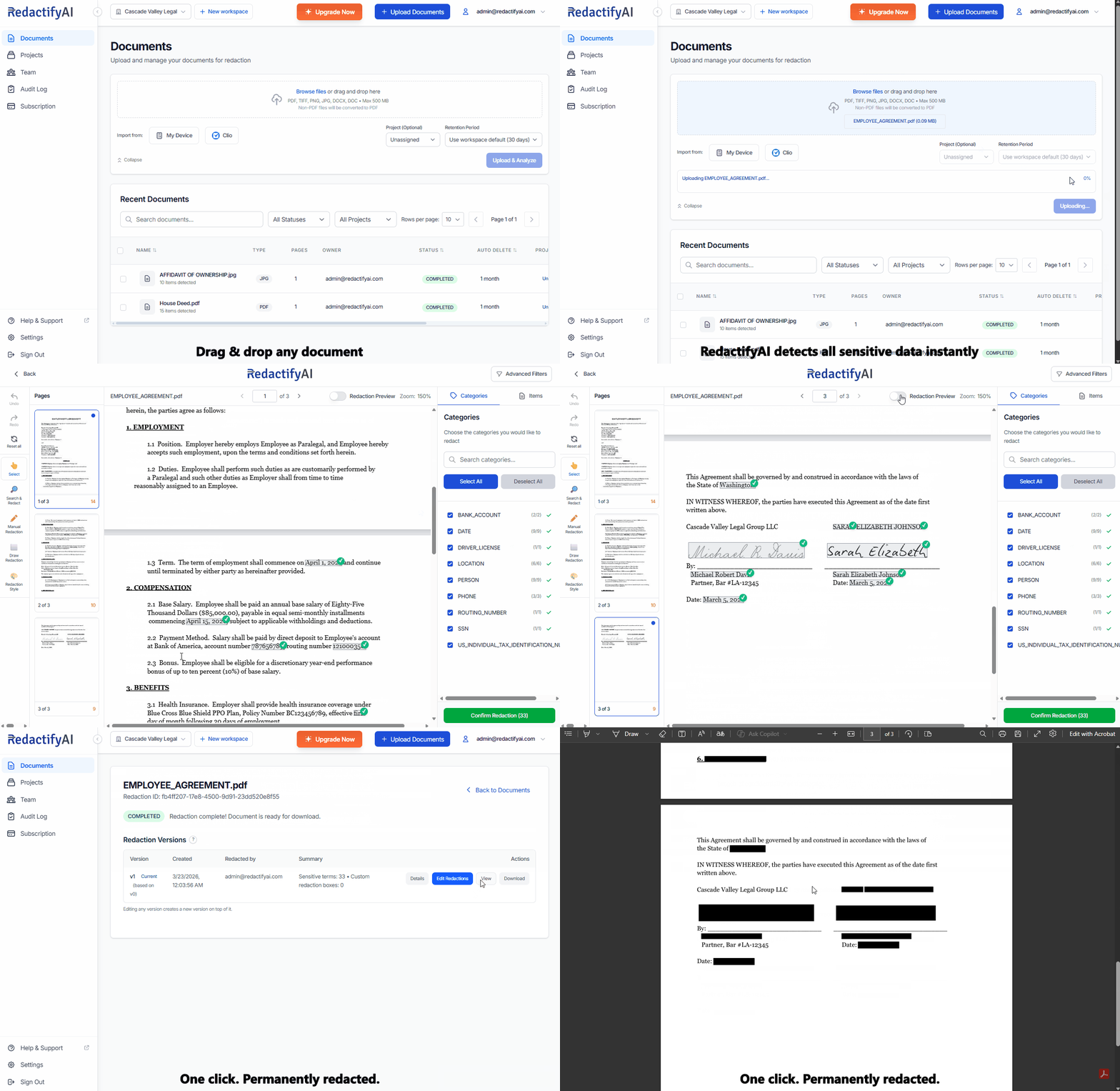
From upload to download in minutes. No training required.
Drag and drop up to 50 documents from your device or import directly from Clio.
RedactifyAI scans for PII, privileged content, and confidential data in seconds.
Side-by-side review with manual override. You stay in control of every redaction.
Export the redacted version or push it back to your Clio matter automatically.
Purpose-built for legal and compliance, so you can justify the choice with clarity.

RedactifyAI reads context, not just patterns. It knows 'John Smith' in a signature block is PII, but 'Smith v. Jones' in a case citation is not.
We log every redaction so you can see who changed what, when, and why. Export an audit report whenever compliance or opposing counsel asks for one.
Review and adjust RedactifyAI-detected redactions before finalizing. Draw custom redaction boxes or fine-tune automatic detections with precision.
All documents are encrypted in transit and at rest using AES-256. Access controls let you decide who can view, redact, or export each document.
Sync redacted documents back to your Clio matter in one click. The redacted version is saved as a new file. Your original is never overwritten. Both versions stay in the same matter, ready for privilege logs or court-ordered in-camera review.
Work entirely in the browser. Redact, review, and send without downloading files to your device. Faster and more secure than local workflows.
Upload up to 50 files from your device or import them from a Clio matter. All documents are analyzed in parallel. Move between files using the document switcher, confirm redactions, and download the full set in one step.
Redact PDF, Word (DOCX, DOC), and images (TIFF, PNG, JPG) without converting between formats. Most redaction tools are PDF-only, forcing extra steps for the contracts, briefs, and correspondence legal teams draft in Word daily.
Scanned PDFs, old court filings, and image-based documents work out of the box. No separate OCR tool, no format conversion. Upload the file you received and the AI reads and redacts it, including faxed records, photographed documents, and image-embedded PDFs that most tools can't touch.
Save multiple redaction versions per document. View, download, or restore any version. Full control over your redaction history and a clear record for compliance.
Compare any two redaction versions of the same document side by side before finalising. Catch every missed redaction before it reaches opposing counsel, a court filing, or your client.
Comprehensive tools and features designed to streamline your redaction workflow while maintaining the highest standards of security and data privacy.
Upload up to 50 files from your device or pull them directly from a Clio matter. Every document is analyzed in parallel. A document switcher lets you move between files during review. Confirm redactions and download the full set when you're done. Most tools require opening and processing each file separately.
Never lose an edit. Save unlimited redaction versions per document. View any version, download any version, and restore a previous version as your current one. Full control over your redaction history. Revert or prove what changed.
Compare any two redaction versions of the same document side by side before finalising. Discovery productions go through multiple redaction passes: one for PII, another for privilege. A redaction present in version 1 can accidentally disappear in version 2 when surrounding content is adjusted or a new pass resets a region. Side-by-side comparison catches this before production.
Supervising partners can review associate redaction work by comparing versions directly, without opening separate files. It serves as the last quality check before a document leaves the firm.
Sync redacted documents back to your Clio matter as a new file. The original is never overwritten or modified. Courts can order in-camera review of unredacted originals. Privilege logs reference them. Bar association rules require complete file maintenance. RedactifyAI preserves both versions in the same matter automatically. No manual duplication step to forget under deadline pressure.
Scanned PDFs, faxed records, and image-based court filings work out of the box. RedactifyAI reads the text automatically. No separate OCR tool, no conversion step. Most redaction tools skip scanned documents entirely, leaving your highest-risk files unredacted.
Complete audit logs for every redaction action. Track who redacted what, when, and why. Generate reports for your records. You have the record when anyone asks.
Bank-level encryption, secure cloud infrastructure, and access controls. Your documents are protected with industry-standard security practices.
Organize documents into projects for better workflow management. Group related documents, track progress, and collaborate with team members efficiently.
Track your document processing with detailed analytics. Monitor page usage, document counts, and team activity to optimize your workflow and stay within plan limits.
Choose from multiple redaction styles including solid blackout and pattern overlays. Apply different styles to different types of sensitive data.
Work together seamlessly with role-based access control. Assign documents to team members, track progress, and maintain version history for collaborative redaction workflows.
RedactifyAI's models are trained on millions of documents to achieve industry-leading accuracy in detecting PII and sensitive information. Its context-aware AI reads surrounding text to reduce false positives and catch what rigid pattern-matching tools miss.

"We used to spend half a day redacting a single production set. Now it takes about twenty minutes, and the AI catches things we used to miss. Our associates actually look forward to discovery prep now."